Publish Code#
Before making your repository public#
Checklist
The repository is under the subdomain of SWW or ENG, e.g.
https://gitlab.eawag.ch/sww/itr/yourproject. If not, contact the admins to transfer the repository.A license is included.
No passwords or sensitive information were included at any point of the development
A README is included.
The code is documented.
Unnecessary parts of the code are removed.
Folders like .idea or .vscode are added to .gitignore and removed.
You added references and links to related work or data in your README.
The code does not include paths to your local Drive.
Create a python package if it makes sense.
You tested if you can install and run the code with the instructions in the README.
Set visibility to public#
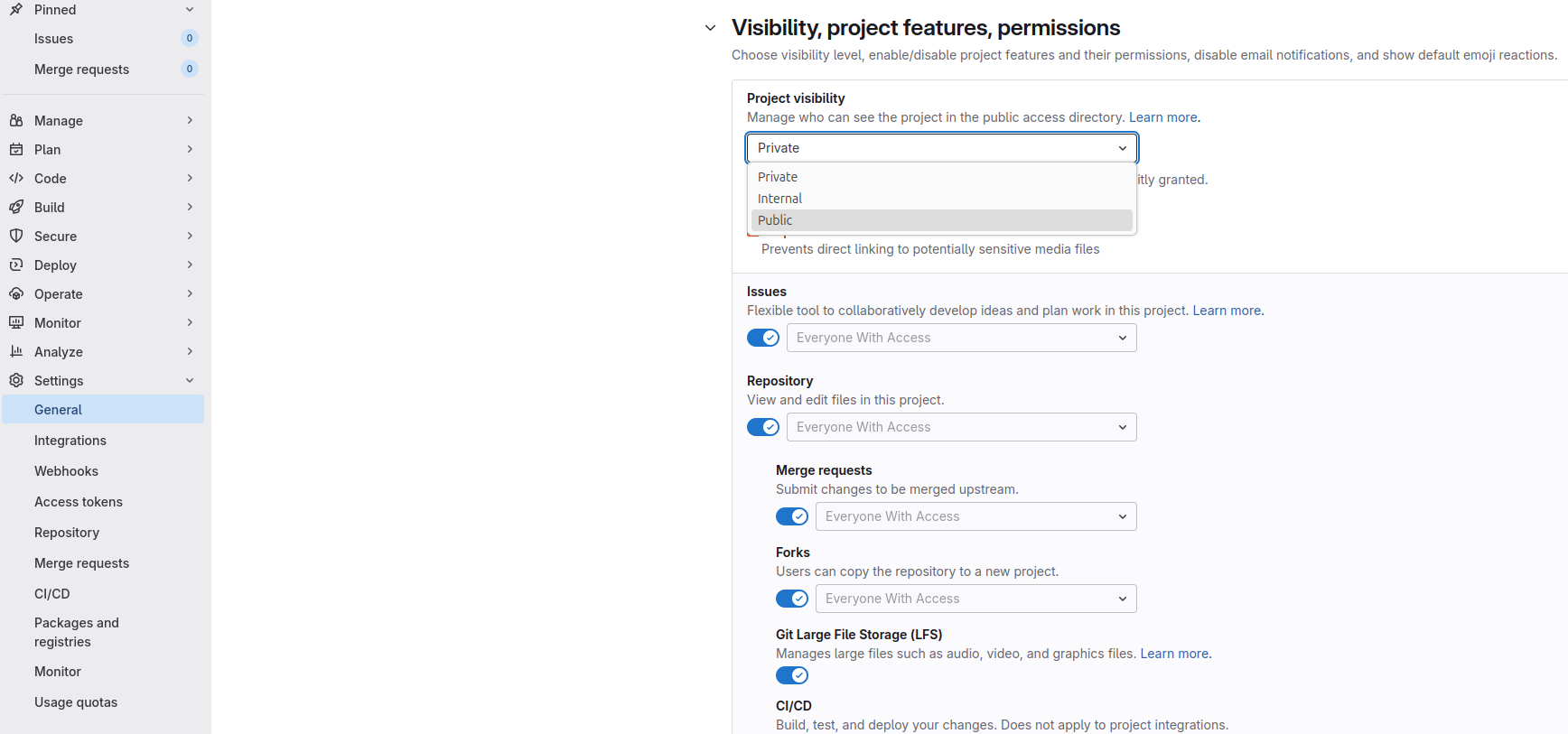
On the project page under Settings –> General –> Visibility, select visibility Public and save changes.
Publish on ERIC or Zenodo#
If you are using your code for a scientific publication, the corresponding version needs to be published on ERIC or Zenodo as well. Follow the ERIC guide on publishing source code
Use semantic versioning, e.g.
yourproject-v1.0.0.zipfor the first stable “official” release.Ensure complimentary data is accessible
Reserve a doi to link in your publication
Include non-standard packages you use