Install Prerequisites#
Here, we provide a selection of programs that are needed for a basic Python setup for Windows.
Getting Started#
If you haven’t done it yet, set up your account, ask your admins for a project and set up the SSH connection.
Install Git#
Git is a distributed version control system that tracks changes in files and enables collaboration by allowing multiple people to work on the same codebase efficiently.
Download git here and install it on your computer.
In the Setup Wizard, you can use the default installation settings.
After the installation, open the Command Prompt (press Windows-Key → type
cmd→ press Enter)Adapt and run the following two commands to set your username and email address (used in commit metadata):
git config --global user.name "Your Name"
git config --global user.email "your.name@eawag.ch"
Install Python#
Python is a high-level, versatile programming language widely used for data analysis, machine learning, web development, and automation.
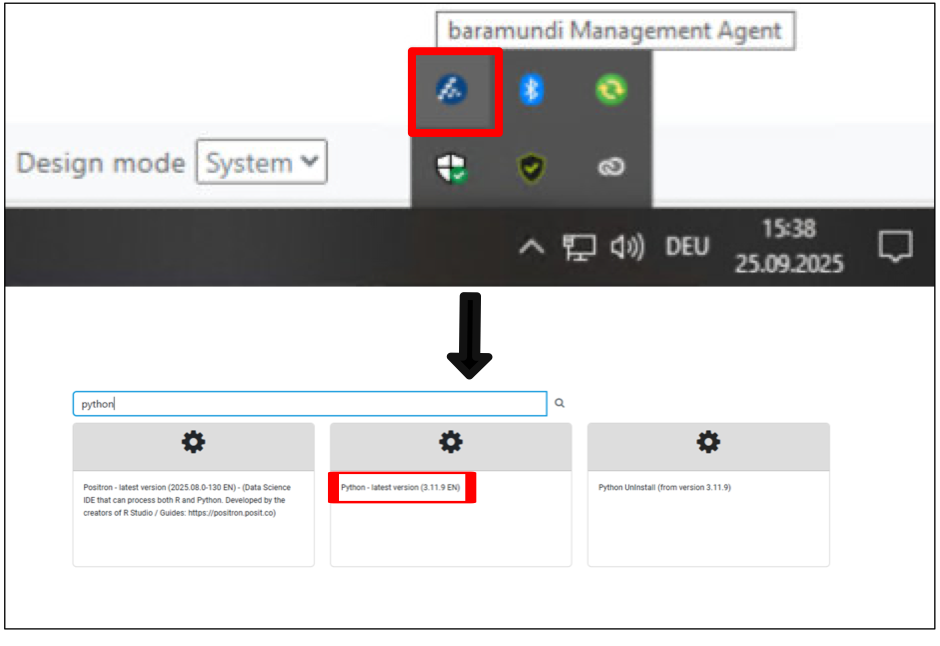
On an Eawag-computer, Python needs to be installed through the Baramundi Kiosk. To open the Baramundi Kiosk, right-click on the blue Baramundi Icon in your task bar on the bottom right. Then select Baramundi Kiosk. This is important because it will set the right environment paths for python.
If you do it on your private computer and have all the admin rights, download it from here: https://www.python.org/downloads/
After the installation, open your Command Prompt and run the following to verify your installation:
python --version
Install Visual Studio Code#
VS Code is a lightweight, extensible code editor from Microsoft with powerful debugging, Git integration, and support for many languages including Python. https://code.visualstudio.com/download
Download VS Code here and install it on your computer.
VS Code offers many useful extensions (5th symbol on the left). For data analysis with Python, we recommend the following:
Python
Jupyter
Data Wrangler